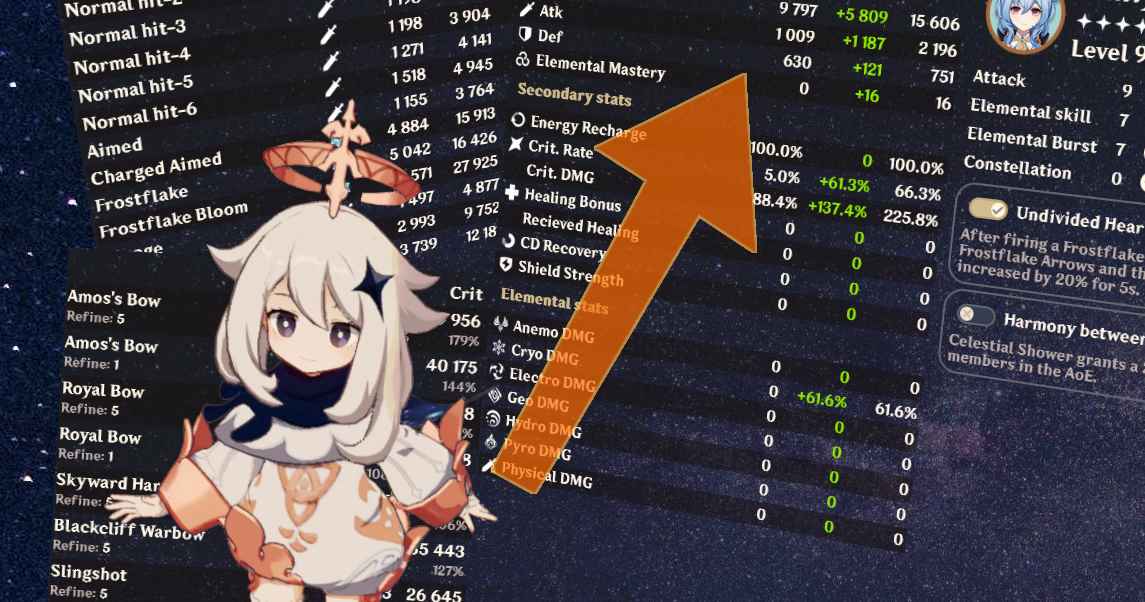
What it is
Aspirine is a web-based damage calculator and build planner for Genshin Impact, originated in the Russian community but also available in English. Its value proposition is offering functionality similar to Genshin Optimizer but with simpler interface and faster setup, without requiring you to input your entire inventory before being able to calculate something useful.
Despite the .su domain (Soviet Union legacy), it's a legitimate and actively maintained project. It remains free, no registration required, and is the calculation tool preferred by a significant portion of the Russian Genshin community.
It doesn't replace Genshin Optimizer in terms of advanced features, but occupies a valid niche for users who prefer simplicity over completeness.
What problem it solves
Genshin Optimizer is the most complete tool for optimization in Genshin, but its completeness comes with cost: extensive initial setup, dense UI, learning curve. For many users, especially when they just want to answer quick questions like "how much damage does my Hu Tao do with this configuration?", opening GO is unnecessary overhead.
Aspirine solves this by delivering functional damage calculator with minimal setup. It doesn't require inputting 50 artifacts, doesn't require configuring entire inventory. You only input the character, weapon, and artifacts relevant to the specific calculation you want to do.
For users who value speed over depth, this operational difference is significant.
What people use it for
Quick damage calculations: the main use case. You want to know how much damage your character does with a certain configuration without opening GO. You input essential data and get result in seconds.
Comparing two configurations: you're hesitating between two artifacts or two weapons. Aspirine lets you compare both scenarios side by side quickly without having to create complete builds.
Verifying impact of changes: what happens if I change my crit damage to crit rate in the circlet? Aspirine calculates the exact difference without having to reconfigure the entire build.
Calculator for casual users: players who don't want to obsess with deep optimization but occasionally want to know theoretical damage, find Aspirine friendlier than GO.
Russian community specifically: for Russian speakers, Aspirine offers native interface which is real advantage. The Russian Genshin community is large and maintains its own ecosystem of tools.
Cross-verification: some theorycrafters use Aspirine as second calculation to verify GO results. If both tools give similar numbers, there's confidence in the result.
The difference with Genshin Optimizer
It's important to understand Aspirine and GO are complementary, not necessarily competitive:
Genshin Optimizer:
More complete in functionalities (mathematical artifact optimizer, scanner integration, builds saving).
Better for serious optimization of entire inventory.
Greater learning curve but greater utility ceiling.
Community standard for deep theorycrafting.
Aspirine:
Lighter and faster to use.
Direct setup without needing complete inventory.
Better for specific calculations or quick verifications.
Available in Russian for that community.
The choice between them depends on your specific use. If you're going to optimize all your characters regularly, GO. If you just want occasional quick calculator, Aspirine. Some users use both.
Honest limitations
Only in English and Russian. The interface has no localization to Spanish or other languages. For Spanish users it can be a barrier, especially because technical terms are in English.
Less features than Genshin Optimizer. Doesn't have automated mathematical artifact optimizer at GO's level. No integration with Genshin Scanner. Team building and comparison functionalities are more limited.
Updates can lag vs GO. When new characters or weapons launch, GO usually has fast implementation. Aspirine can take longer to add new content, especially for very specific characters.
Doesn't have such large community. Most guides and tutorials assume you use GO. Aspirine has active community but much smaller, which means fewer learning resources, less discussion, less cross-validation.
The .su domain can raise doubts. Although it's a legitimate project, some users initially distrust the unusual TLD. Worth knowing it's safe and reliable despite the domain.
Less deep functionalities for advanced cases. For really deep theorycrafting (complex team buff interactions, specific character mechanics), GO handles these cases better.
Limited documentation. GO has extensive tutorials on YouTube and documentation. Aspirine has less educational content available, which can make learning difficult for users who prefer video tutorials.
How it's used in practice
The basic flow is direct:
You go to
genshin.aspirine.su. The interface shows you character options.You choose the character you want to calculate.
You input essential data: weapon, refinement, talents levels, ascension.
You input the character's 5 artifacts with their main and relevant stats.
The tool automatically calculates total damage and per skill.
If you want to compare variations, adjust values and see immediate impact.
Unlike GO, you don't have to input your complete inventory. Only the specific character's artifacts you're calculating. This makes setup much faster for specific calculations.
For recurring use with the same character, you can save configurations (some functions require account). For users who just want occasional calculation, without account it also works perfectly.
How to get started
Doesn't require installation, registration, or account. You go to genshin.aspirine.su from any browser.
For your first time, practical recommendation: test with a character you already have builded in-game. Input their exact data and verify that damage calculated by Aspirine resembles what you see in-game. This validates you're inputting everything correctly.
Once familiar with the interface, use it for cases where GO feels excessive: quick verification of an artifact change, comparison between two weapons before pulling, casual calculation without commitment.
For more serious optimization, honest recommendation is to complement Aspirine with Genshin Optimizer. Aspirine is good for quick specific calculations, GO is better for deep analysis and complete inventory optimization.
For Spanish-speaking users, also worth considering that Genshin Optimizer is available in Spanish, while Aspirine is not. If language barrier is important factor, GO can be better option despite greater complexity.
Alternatives to Aspirine
If Aspirine isn't the right fit, these Genshin Impact tools cover similar needs.