What it is
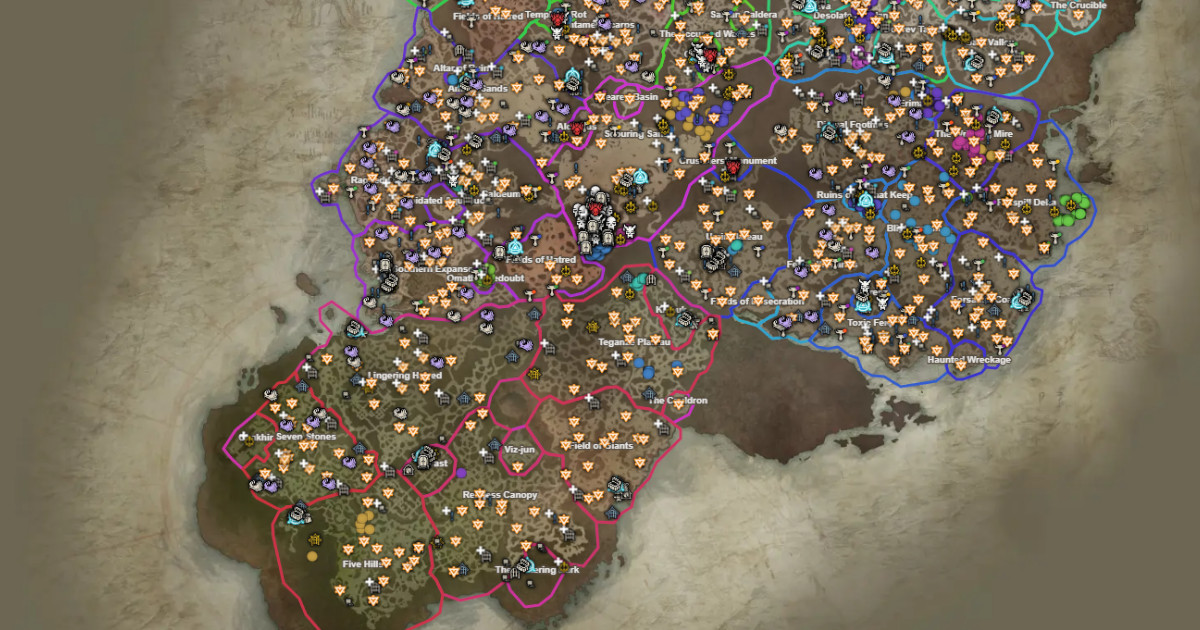
TH.GL Diablo IV Map (diablo4.th.gl) is an interactive Sanctuary map created by Leon Machens. The defining feature is collaborative drawing: draw routes, marks, notes over the map and share with your group via permanent link. Also available as an in-game overlay via Overwolf app.
What problem it solves
To coordinate Helltide routes, dungeon clearing strategies, or boss positioning with your static, screenshots with annotations are inefficient. TH.GL lets you draw live over the map, sharing real-time with your group.
How it differs from MapGenie
- MapGenie: most complete POI coverage + progress tracking + mobile app. No drawing.
- TH.GL: collaborative drawing + sharing. Base coverage less than MapGenie.
For completion tracking, MapGenie. For collaborative coordination, TH.GL.
What people actually use it for
Route planning with static: draw an efficient Helltide route and share with group.
Strategy sharing: for multi-boss dungeon clears, mark boss positions and player roles.
Tutorial visuals: content creators use drawing for guides — mark specific POIs.
In-game overlay: with Overwolf, see map overlay during gameplay.
Open source: auditable code, community contributions welcome.
Who it's NOT for
- Solo players without coordination needs: drawing is overkill.
- Those wanting completion tracking: MapGenie better.
- Casuals without endgame: drawing routes assumes goal-oriented play.
- Mobile-first: drawing UI is desktop-optimized.
How it's actually used
Open map. Drawing tools in sidebar.
Draw routes, marks, annotations.
Share → generates permanent link.
For in-game overlay: install Diablo 4 Map By Leon on Overwolf.
Coordinate drawings with static via Discord.
Honest limitations
Smaller community: less recognized brand than MapGenie or Helltides.com.
Modest base coverage: less comprehensive POIs than MapGenie.
Drawing UI learning curve: drawing tools take time to master.
Update lag with patches: new content takes time to be mapped.
Overlay setup overhead: Overwolf platform install requirement.
How to get started
Get familiar with map basics.
Try drawing tools — mark a Lilith statues route as a test.
Share link to yourself, verify it appears correctly.
For overlay: install Diablo 4 Map By Leon via Overwolf if you want in-game integration.
For coordinated play, share drawings with static — workflow most valuable when an active group exists.
Alternatives to TH.GL Diablo IV Map
If TH.GL Diablo IV Map isn't the right fit, these Diablo IV tools cover similar needs.