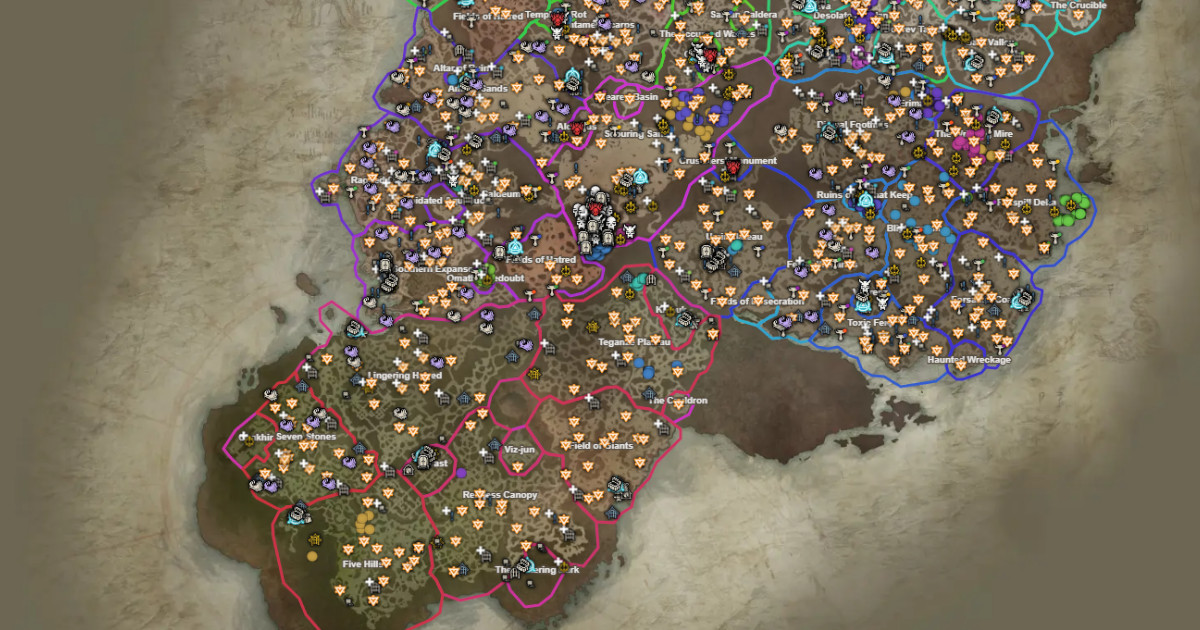
What it is
MapGenie is a cross-game interactive map platform (covers 50+ games including Elden Ring, Hogwarts Legacy, RDR2). Its D4 version (mapgenie.io/diablo-4) covers all of Sanctuary with dungeon entries, waypoints, side quests, Altar of Lilith locations, statues, gathering nodes, and collectibles. Plus a mobile app companion for iOS and Android.
What problem it solves
D4 in-game has maps but no "what's left to collect" layer. Altars and statues count toward permanent power gains — knowing which you have vs missing, in extensive zones like Hawezar, without external tracking is prohibitive. MapGenie shows exact location + checkable status.
How it differs from in-game maps + Helltides.com
- In-game: limited filters, no progress tracking.
- Helltides.com: single-purpose (Helltide timing).
- MapGenie: comprehensive map exploration with exhaustive progress tracking and mobile app.
MapGenie dominates when the goal is completionist exploration; Helltides.com dominates when the goal is Helltide farm efficiency.
What people actually use it for
Lilith statue hunting: altars give permanent power. MapGenie marks which you've collected so you don't revisit zones.
Side quest completion: for completionist players, see which quests are missing per region.
Dungeon location lookup: for aspect codex grinding, MapGenie locates the dungeons that drop specific aspects.
Mobile reference during gaming: the mobile app lets you check locations without alt-tab from PC.
Multi-game players: if you already use MapGenie on other games (Elden Ring, etc.), the UI is familiar.
Who it's NOT for
- Casuals without completion goals: if you don't farm altars or achievements, MapGenie adds nothing.
- Those avoiding login: free tier works without login but persistent progress tracking requires an account.
- Mobile-only without desktop: the app works but web is more comfortable for detail.
- Players who prefer pure in-game maps: if external tools bother you, it's not for you.
How it's actually used
Login optional but recommended for persistent tracking.
Sidebar filters: mark which POI types you want to see (Lilith statues, altars, dungeons, etc.).
Click POIs for detail. Mark them as "Found" when you get them in-game.
For mobile: install the official app, sync with your web account.
Per-zone progress visible — orients you to which zone has the most missing.
Honest limitations
Free tier ads: there are display ads. Premium tier ($3/mo) removes them plus extra features.
Manual marking: doesn't automatically detect what you got in-game (D4 exposes no API). You click "Found" manually.
Post-patch update lag: when new zones or secrets land in patches, MapGenie takes days to add them.
No timer features: not a replacement for Helltides.com — doesn't track spawn timings.
Cross-game brand: the team is split between many games. D4 specifically isn't an absolute priority.
How to get started
mapgenie.io/diablo-4/maps/sanctuary, login for tracking.
Filters: start with Altar of Lilith filter only — shows you all statues.
While playing in-game, when you collect one, click "Found" on the web (or app).
Eventually expand filters to Renown, side quests, etc.
For mobile: install the iOS/Android app for on-the-go access.
If ads bother you, consider Premium tier for a clean experience.
Alternatives to MapGenie Diablo IV
If MapGenie Diablo IV isn't the right fit, these Diablo IV tools cover similar needs.