What it is
Gale is an open-source (GPL-3.0) mod manager built by Kesomannen. It speaks the same protocol as r2modman (Thunderstore) and supports the same 150+ games, but it's built on Tauri instead of Electron — the result is a ~15MB installer instead of ~150MB and a client that opens in under a second.
It's relatively young (first public releases in 2024) but adoption is climbing, especially among users frustrated by r2modman performance or UI clutter.
What it solves
r2modman is functional but heavy: Electron + Vue, ~200MB RAM idle, ~10s to load a big profile. For someone with a mid-tier PC or who opens the manager often, that matters.
Gale targets those pain points directly:
- Small bundle (Tauri compiles to a native binary) — installer ~15MB.
- Low RAM — ~50MB with a profile loaded, vs r2modman's ~200MB.
- Faster UI — smooth animations, instant search, fluid scrolling on 500+ mod catalogs.
- Imports r2modman profiles directly — migration is a single click.
Differentiation
Vs. r2modman: Gale is faster and newer. r2modman has more years in production, handles edge cases (broken metadata, old version conflicts) better, and has a larger troubleshooting community. To get started, both are equivalent; for unusual issues, r2modman has more mileage.
Vs. Thunderstore Mod Manager (Overwolf): Gale is OSS, no tracking, no Overwolf account or overlay required. Its user profile is the opposite of TMM.
Vs. manual install: same as r2modman — not a competitor, a full replacement.
What people use it for
Modest PC — laptops with 8GB RAM or older CPUs where r2modman lags: Gale boots fast and barely touches the CPU.
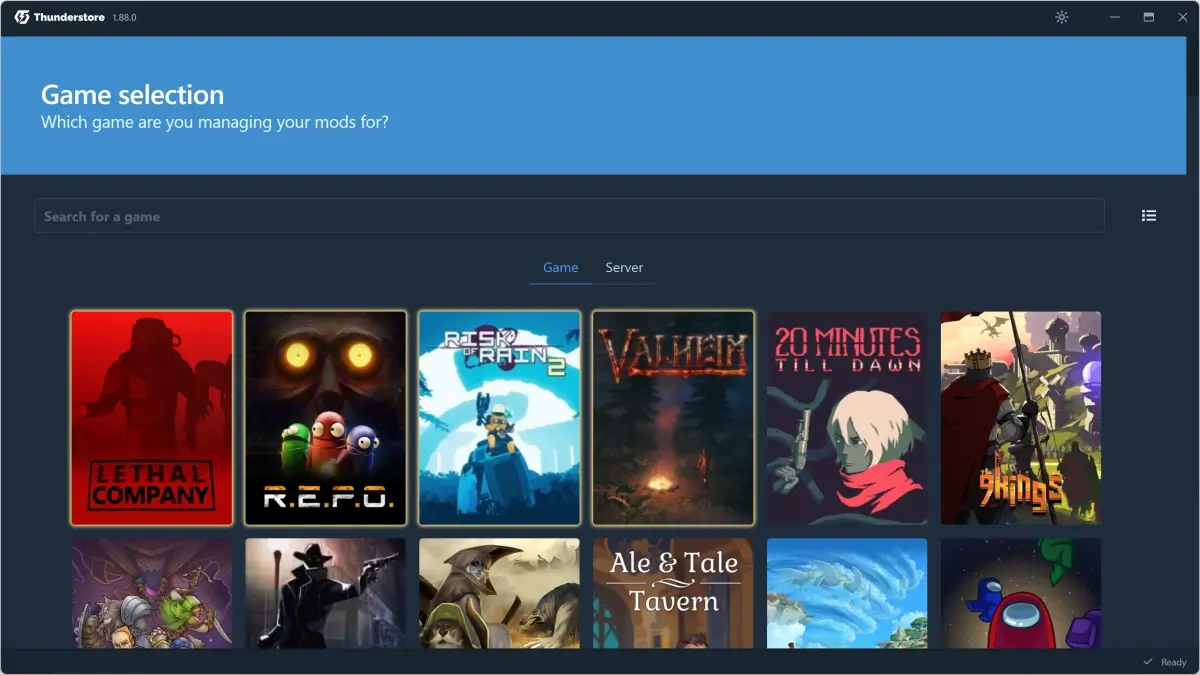
Multi-game Thunderstore users — modding Valheim + Lethal Company + REPO + Risk of Rain 2 from one hub. The game-picker tab is cleaner than r2modman's.
Import/export workflows — Gale's profile format interoperates with r2modman (reads and writes both), making it easy to share modlists between friends on different managers.
Decent dark mode — Gale's UI has a polished dark theme, while r2modman feels mismatched.
Mod beta testing — Gale supports Thunderstore beta versions with a toggle, useful when a mod publishes a preview of breaking changes and you want to test before the rest.
Who this tool is not for
If you're already on r2modman with no complaints: no urgency to switch. Both solve the same problem; Gale is marginally better on performance but doesn't transform the workflow.
If you mod games outside Thunderstore (Skyrim, etc.): same as r2modman, doesn't apply.
If you rely on manager plugins or advanced features r2modman accumulated over years: Gale is younger, its surrounding tool ecosystem is smaller (fewer guides, less Reddit troubleshooting).
How it works in practice
- Download Gale from its Thunderstore page or GitHub releases (
github.com/Kesomannen/gale/releases). - Install — the installer is small and fast on any OS.
- On first launch, pick "Valheim" from the games list.
- If you already use r2modman, "Import from r2modman" pulls profiles directly. Starting fresh, "Create new profile".
- In "Browse", search mods by name, category, or tag. Click to install.
- "Launch modded" injects BepInEx + mods and starts the game.
- To manage profiles, use the "Profiles" tab — duplicate, export, import, all from the sidebar.
Honest limitations
Younger than r2modman. If it breaks on a specific mod or a dependency edge case, documentation is thinner. r2modman has 5+ years of resolved GitHub issues; Gale has 2.
Smaller extension ecosystem. r2modman has community plugins for things like nightmare-mode profile management. Gale doesn't.
Frequent updates — being actively developed means frequent releases. Good for fixes; annoying if you want a manager you don't touch for months.
Short official docs. The wiki is basic; most support lives in the Thunderstore Discord.
Getting started
- Go to
thunderstore.io/c/valheim/p/Kesomannen/GaleModManager/or GitHub releases. - Download the installer (Windows .exe, Linux .AppImage, macOS .dmg).
- Open Gale, pick "Valheim".
- Coming from r2modman, click "Import profiles" in settings.
- Fresh start: "New profile" → name it "Survival QoL" → install BepInExPack + Jotunn + 2-3 QoL mods.
- Click "Launch modded".
For support, the Thunderstore Discord (discord.gg/thunderstore) has a dedicated Gale channel.
Alternatives to Gale Mod Manager
If Gale Mod Manager isn't the right fit, these Valheim tools cover similar needs.