What it is
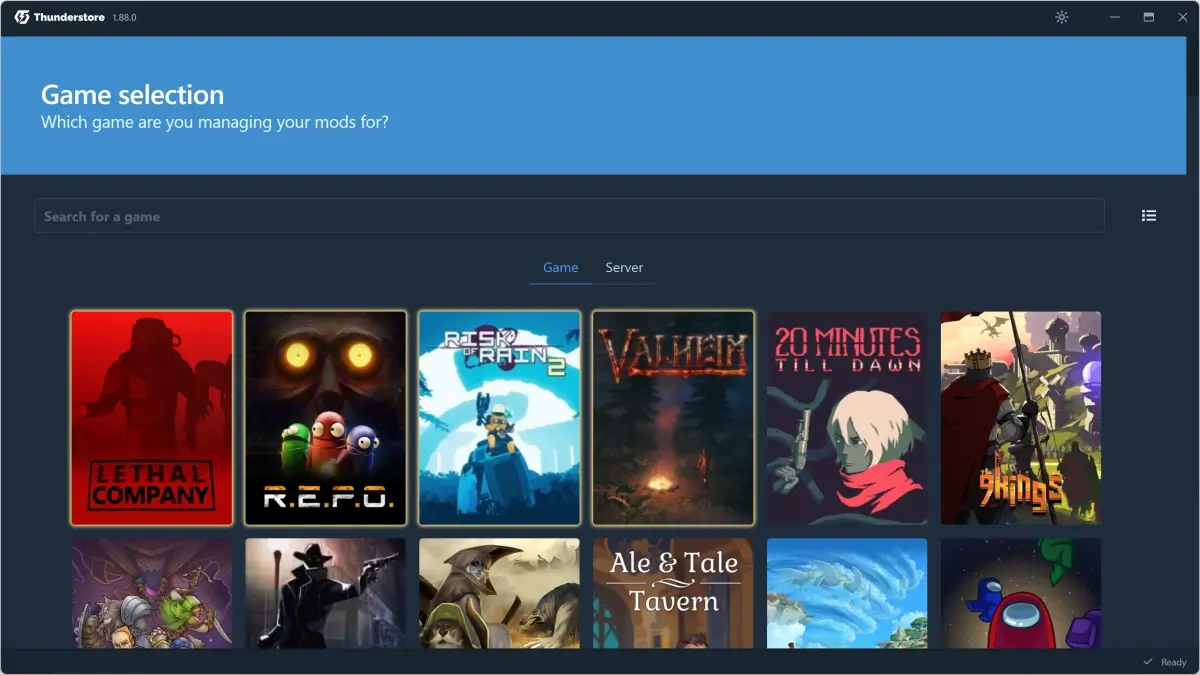
Thunderstore Mod Manager (TMM) is Thunderstore's official mod-management app, distributed through Overwolf — an in-game overlay platform that monetizes via optional ads and ships an SDK for devs. TMM covers the same games as r2modman and Gale (Valheim, Lethal Company, REPO, Risk of Rain 2, etc.), with the Thunderstore team's endorsement.
Unlike r2modman/Gale, TMM is not open-source and requires installing Overwolf first. In return, it offers an in-game overlay to open the manager while playing (Ctrl+Shift+M by default), notifications of mod updates without opening the app, and a guided installer that detects common problems.
What it solves
The target is clear: people who never modded a game and feel intimidated by a standalone installer. TMM removes friction around:
- "Where did Steam install the game?" — Overwolf integrates auto-detection.
- "What folder is BepInEx?" — TMM downloads and configures it without showing the user the filesystem.
- "How do I update everything?" — the in-game overlay notifies and updates in one click.
- "Are mods actually working?" — TMM exposes BepInEx logs in a dedicated tab with error highlighting.
For someone coming from console or who's never touched the game files, TMM lowers the entry barrier significantly.
Differentiation
Vs. r2modman and Gale: the mod-management feature set is the same (same Thunderstore catalog, same profile flow, same BepInEx). Real differences:
- TMM requires Overwolf installed (~150MB) and an Overwolf account (free, but signup required).
- TMM has an in-game overlay — open the manager with a shortcut without alt-tabbing. r2modman/Gale don't.
- TMM is not open-source; the code lives closed inside Overwolf.
- TMM monetizes with optional ads from Overwolf in the main panel (toggleable in settings, but on by default).
If overlay doesn't matter and you distrust tracking, r2modman or Gale are better picks. If you want the most guided possible flow, TMM is.
What people use it for
First mod ever — users new to modding who feel safer with an installer integrated into a recognizable platform (Overwolf has several million users).
Multi-game Overwolf users — someone who already has Overwolf for CurseForge (Minecraft) or Outplayed (auto-replays for LoL/Valorant) tacks on TMM without adding another app.
In-game overlay — opening the manager with Ctrl+Shift+M mid-Valheim session to toggle a mod without quitting the game is genuinely useful. r2modman forces an alt-tab.
YouTube tutorials — most "how to mod X" tutorials use TMM because it's the most photogenic (polished UI, clickable installs, visible notifications). To follow those videos step-by-step, TMM helps.
Update notifications — TMM can notify when a mod ships a new version even if the app isn't open. For critical mods on shared servers, that's practical.
Who this tool is not for
If you want to avoid Overwolf because of overhead or trust (ads, telemetry, another background service): TMM isn't it.
If you mod on Linux or macOS: TMM is Windows-only. r2modman/Gale are cross-platform.
If you already have an active r2modman modlist: it doesn't migrate cleanly. You'll have to recreate the profile.
If you value open-source and auditability: TMM isn't. r2modman and Gale are.
How it works in practice
- Install Overwolf from
overwolf.comif you don't have it. - Once Overwolf is running, open its in-app App Store.
- Search "Thunderstore Mod Manager" and install.
- TMM opens inside Overwolf. Pick "Valheim" from the list.
- Create a profile.
- In "Browse", click-install mods.
- Click "Start modded" — TMM launches Valheim with BepInEx and the mods.
- In-game,
Ctrl+Shift+Mopens the overlay to toggle mods without leaving.
Honest limitations
Overwolf required. ~150MB extra, account creation, and a background service. For many that's a dealbreaker.
Occasional ads. TMM's main panel shows Overwolf ads (banners for other apps). A toggle disables them, but they default on.
Windows only. No Linux, no macOS.
Closed source. You can't audit the code or contribute bugs directly. The community reports issues in the Thunderstore Discord, but fixes ship when the team decides.
Not obviously faster. The "easier" promise applies to onboarding, not speed: TMM runs inside Overwolf, which is Electron-like itself.
Getting started
- Go to
overwolf.comand download Overwolf. Install. - Open Overwolf and access the in-app store.
- Search "Thunderstore Mod Manager" and install.
- Open TMM, pick "Valheim".
- Create a profile.
- Install BepInExPack + Jotunn + 2-3 QoL mods.
- "Launch modded" to run.
If you ever get tired of Overwolf, you can migrate to r2modman by exporting the profile (TMM allows it) and reimporting there.
Alternatives to Thunderstore Mod Manager
If Thunderstore Mod Manager isn't the right fit, these Valheim tools cover similar needs.